


The verdict · PoolRx+
PoolRx+ is a reasonable algae-control supplement with a real mechanism behind it: copper is an established algaecide, and the unit adds it without new plumbing or wiring. After a few weeks in my pump basket, I seem to need a little less chlorine to keep my ORP up, but that observation overlaps with cooler fall weather, so I can't put a percentage on it. It is not a chlorine replacement, it adds metals to the water, and the label's 0.5–1.0 ppm chlorine target is below CDC's minimum for stabilized pools. Buy it as an extra tool, not as permission to stop testing.
What works
- Drops into the pump or skimmer basket with no plumbing, wiring, or daily dosing
- Copper-based algae control has a documented scientific basis
- Early sign of lower chlorine demand while holding the same ORP range on my ICO
- Rated for up to six months of algae control per unit
- NSF/ANSI/CAN 50 certified, with an EPA registration number on the box
What doesn't
- Adds copper, zinc, and silver to the water; copper staining is a real risk
- Label's 0.5–1.0 ppm chlorine target is below CDC's 2 ppm minimum for pools using CYA
- Manufacturer's 'up to 70%' chemical-reduction claim is not something I can verify in a few weeks
- Not compatible with bromine or biguanide systems
- $79–$99 per unit plus boosters is a cost you have to recover in saved chlorine
PoolRx+ — key specs
| Unit reviewed | PoolRx+ Blue/White, labeled for 7,500–20,000 gallons |
|---|---|
| Active ingredients | Copper sulfate pentahydrate, zinc sulfate monohydrate, silver nitrate; copper as metallic not less than 22% |
| EPA registration | EPA Reg. No. 79817-4 |
| Certification | NSF/ANSI/CAN 50 |
| Placement | Skimmer basket (good flow) or pump basket; some smaller units float in the pool |
| Dissolve time | Minerals dissolve within 1–6 hours per the included insert; the housing stays in place |
| Rated duration | Up to 6 months of algae control; boosters replenish minerals around 4–6 months |
| Not compatible with | Bromine or biguanide sanitizers; other copper-based algaecides |
| Price at publication | $79 (Blue/White), $99 (Black/White); boosters sold separately |
On this page
A small unit that sits in your pump basket, helps control algae, and might mean adding less chlorine sounds appealing. The question is whether PoolRx does that, or whether it is another pool product making a big promise.
I've had a PoolRx+ unit in my pump basket for a few weeks. So far, I seem to need a little less chlorine to keep my ORP high, which I track with my Ondilo ICO pool monitor. That is encouraging, with an important catch: I'm also heading into fall. This is not a controlled comparison under identical summer conditions, so I'm not going to credit PoolRx with every improvement.


My early take: PoolRx is worth considering as an algae-control supplement. It is not a replacement for chlorine, a chemical-free pool system, or permission to stop testing your water. Its copper-based approach has a legitimate scientific basis. Whether it saves you enough chlorine to justify the cost is a separate question, and a few weeks is too soon for me to answer it.
What PoolRx Is
PoolRx is a mineral-based pool algaecide. The basket-style unit holds mineral granules that dissolve into the water and circulate through the whole pool, rather than treating only the water around the device. The company markets its full-size pool units as providing algae control for up to six months, depending on conditions.
There are different formulations, which matters before you buy. The original blue PoolRx lists copper sulfate pentahydrate as its active ingredient. The PoolRx+ unit I bought lists copper sulfate pentahydrate, zinc sulfate monohydrate, and silver nitrate on the box, with copper as metallic at not less than 22%. They are the same product family, but not the same formula.
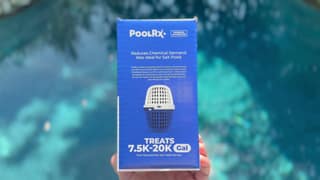
For the standard basket-style products, the appeal is simple. You do not install a separate electrical system or replumb the equipment pad. You pick the size for your pool volume and place the unit in a location the manufacturer approves, with adequate circulation.
What PoolRx Is Not
Think of PoolRx as an additional tool for controlling algae, not your entire pool-care system.
It does not replace your filter, remove leaves, balance pH, or eliminate the need for a chlorine residual. The directions insert in my box still requires chlorine, balanced water, and a clean filter.
And "mineral-based" does not mean chemical-free. Copper sulfate is a chemical, and it is registered with the EPA as a pesticide (the registration number is printed on the box). You may be reducing the amount of one product you use while introducing another. That isn't automatically a bad trade. It is just a more accurate description than saying PoolRx eliminates pool chemicals.
The Science Behind PoolRx
The basic algae-control mechanism is real.
Copper sulfate is an established algaecide. According to the National Pesticide Information Center, copper binds to proteins in algae and fungi, damaging their cells and interfering with normal function. This is not an empty plastic container relying on a mysterious effect.
PoolRx's explanation is that controlling algae leaves chlorine with less algae-related work to do. That makes a reduction in chlorine demand plausible, particularly in a pool where algae contributes a lot of that demand. It does not establish how much any particular homeowner will save.
There is also a distinction between the established science of copper as an algaecide and the manufacturer's description of its system. PoolRx says the cylinder "rejuvenates" the minerals as circulating water passes back through it. That is the company's explanation, not a mechanism my few weeks of use could verify.
The strongest case for PoolRx is the plain one: it adds an algae-control treatment that may reduce some of the burden on chlorine. There is no need to turn that into a claim that chlorine is unnecessary.
My Experience After a Few Weeks
I installed the PoolRx+ in the pump basket, and my early impression is positive.
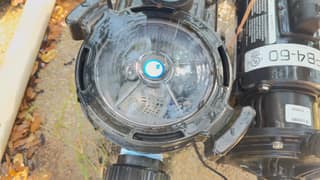
The change I've noticed is modest: it seems to take a little less chlorine to keep my ORP high. I'm watching those trends through the ICO rather than judging the product by how the pool looks.
I'm not putting a percentage on those savings, for two reasons.
First, my testing overlaps with the transition into fall. Shorter days, cooler water, and fewer swimmers all lower chlorine consumption on their own. Sunlight, dirt, and what swimmers bring into the water are the main drivers of chlorine demand, and all three dropped at about the same time the PoolRx went in.
Second, I haven't been logging the actual ounces of chlorine added alongside free chlorine, pH, stabilizer, weather, and bather load. Without that, "a little less" is an impression, not a measurement.
So the fair conclusion is this: PoolRx may be contributing to the improvement I'm seeing, but a few weeks of overlap with changing seasons cannot tell me how much of it comes from PoolRx versus the calendar. I plan to keep it in through next summer and compare against last year's chlorine purchases.
Why I Use the ICO to Monitor the Pool
This is where my Ondilo ICO pool water monitor comes in.
For me, the ICO has become a must-have pool tool, and I recommend it to anyone who wants to see what their water is doing between manual tests. It measures pH, ORP, and water temperature every hour and graphs the trends in its app. That makes it useful for watching a change over time rather than relying on a single snapshot.
With PoolRx, that visibility is especially helpful. I can see what happens after each chlorine addition and watch whether the pattern changes week to week.
ORP is not the same measurement as free chlorine in parts per million, though. ORP measures oxidation-reduction potential, and its relationship to chlorine depends on water chemistry, including pH and stabilizer. There is no single ORP-to-chlorine conversion that works for every pool.
My recommendation is to use the ICO for ongoing monitoring alongside a drop kit, not instead of one. The probes also need the cleaning and calibration Ondilo specifies. A nice-looking ORP trend is not permission to ignore free chlorine or CYA.
Does PoolRx Actually Reduce Chemical Use?
It may reduce chlorine demand, but "reduces chemicals" needs unpacking.
PoolRx advertises substantial potential reductions in chemical demand, including "up to 70%" on its website. Treat that as a manufacturer claim, not an expectation for every pool, and not a result I've established in mine.
The distinction I care about is using less chlorine to maintain an appropriate residual, not accepting less sanitizer in the water. This is where the directions insert gave me pause.
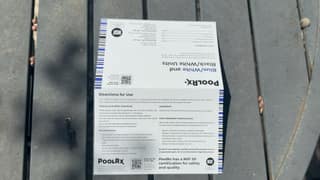
The insert says PoolRx "makes chlorine approximately 10x more active" and tells you to maintain a chlorine level of 0.5–1.0 ppm with the product in use. For context, CDC's home-pool guidance recommends at least 1 ppm free chlorine in pools without CYA and at least 2 ppm when CYA or stabilized chlorine is used. Those are minimums, not ideal targets. My pool uses stabilizer, so I'm keeping free chlorine at or above 2 ppm regardless of what the PoolRx label says, and I'd suggest you do the same. Lower chlorine demand is a benefit. A lower chlorine target is a public-health decision I'm not willing to outsource to an algaecide label.
There is also no reason to assume PoolRx eliminates every other treatment your water may need. The same insert still calls for a clean filter, pH between 7.2 and 7.8, and 2 ppm chlorine whenever the pool is green or cloudy.
Financially, the question is simple: does the value of the chlorine and algaecide you actually avoid buying exceed the cost of the unit and any boosters? For my pool, a few weeks is too early to say it has paid for itself.
What I Like and What Gives Me Pause
The appeal is the simplicity. The unit requires no powered installation, PoolRx sells sizes for different pool volumes, and the prospect of extra algae control without another daily dosing routine is attractive. I also like my early observation of needing a little less chlorine to hold the ORP range I watch. It is not a proven savings figure, but it is the reason I'm still interested.
The biggest tradeoff is adding metals to the water. Copper staining is a real pool-care problem, and the unit's purchase price is another expense to justify. I'd also be cautious about buying with unrealistic expectations. If your pool is already easy to maintain, the extra product may offer less value than it does for someone fighting recurring algae.
The Biggest Caution: Copper and Staining
This is the part of a PoolRx review I would not skip.
Copper can stain pool surfaces, and copper-related green discoloration of hair is well documented, especially in light or chemically treated hair. These are general copper risks, not proof that every correctly used PoolRx unit will cause either problem.
PoolRx says its proprietary chelation process helps keep its metals from staining. I would not read that as permission to ignore water balance, existing metals, or product sizing.
The manufacturer's pre-installation steps include testing for metals like copper and iron, addressing levels above 0.2 ppm before installing, and avoiding other copper-based algaecides. PoolRx also notes that chelation can affect routine copper-test results, so an unexpectedly low reading should not automatically be read as metal-free water.
My advice is especially cautious for a pool with existing metal stains or a history of copper problems. Resolve that before adding another mineral treatment. Check your pool finish and equipment care requirements too; I would rather confirm compatibility beforehand than argue about a stain or a warranty afterward.
Which PoolRx Size Do You Need?
Buy according to your actual pool volume and the exact product label, not whichever color is cheapest. The current PoolRx+ pool range covers these sizes:
| PoolRx+ unit | Labeled pool capacity |
|---|---|
| Red/White | 2,500–5,000 gallons |
| Orange/White | 5,000–7,500 gallons |
| Blue/White (reviewed) | 7,500–20,000 gallons |
| Black/White | 20,000–30,000 gallons |
The company also sells smaller spa products and configurations for larger pools. Those are not interchangeable with the standard pool units.
More is not better here. Do not improvise an oversized dose or add an extra booster "just to be safe." Every extra unit is more copper in the water.
How to Install PoolRx
I put mine in the pump basket, but that is not the only option. Correct placement depends on the specific PoolRx product and your equipment.
Before installation, confirm the size, test for metals, and start with a clean skimmer basket, a clean pump basket, and a clean filter. The PoolRx+ insert also calls for pH between 7.2 and 7.8 and chlorine below 10 ppm before adding the product. Follow the directions on your exact package.
Option 1: Pump Basket (Where I Installed Mine)
For the full-size units, PoolRx lists the pump basket as an approved location. The unit belongs inside the strainer basket, not loose near the impeller.


Use your pump's own opening and priming procedure. The sequence I followed:
- Shut the pump off and prevent an automatic restart. On my system that meant switching the automation panel to service mode and pressing the Filter Pump button. If you have a chemical feeder or salt cell, disable it during maintenance.
- Relieve system pressure per your filter manual before opening the pump lid.
- Remove debris and inspect the basket. Mine was full of leaves, so I rinsed it before the PoolRx went in. Confirm the unit fits without preventing the basket from seating or blocking flow.
- Place the unit in the basket, then prepare the pump for restart according to its manual.
- Check the lid O-ring, secure the lid, and restore your valve positions. Never start a pump against a closed flow path or let it run dry.
- Restart and bleed air as instructed, standing clear of pressurized equipment. Watch for normal flow, leaks, and unusual filter pressure.


The insert says the minerals dissolve within one to six hours, so install when the pump will run for several hours afterward. PoolRx's original full-size directions ask for at least three to four hours of remaining runtime; other startup instructions vary by product and filter type.

Option 2: Skimmer Basket
The skimmer is the other manufacturer-supported location for the full-size units. PoolRx's insert lists the skimmer first, "if there is good water flow," with the pump basket as the alternative. Keep the basket clear enough for circulation.
Do not combine concentrated pool chemicals in the basket. Placement instructions for one product are not permission to mix it with chlorine tablets or anything else.
Option 3: Floating Placement for Certain Smaller Products
Some smaller products have different instructions. The current red/white product page describes placing that unit directly in the pool or spa, where it floats.
That does not mean every PoolRx unit is designed to float. Confirm that your exact model permits this placement, and because some online directions conflict, resolve any discrepancy with PoolRx before use.
What About PoolRx Boosters?
A booster is not the same thing as a new basket unit. PoolRx says its booster must be used with an existing compatible cylinder and should not be poured back inside that cylinder.
Current booster instructions list the skimmer, a floater, or pre-diluted application into the pool, depending on the applicable directions. Use only the route and preparation specified for your product; never improvise a mixture with chlorine or another chemical.
Do Sand, Cartridge, and D.E. Filters Need Different Procedures?
Potentially. PoolRx+ publishes different startup procedures for sand, cartridge, and diatomaceous-earth filters, including temporary changes to filtration arrangements. Follow both the exact product label and your filter's operating requirements, and don't apply instructions to equipment that doesn't permit them.
One inconsistency to flag: the original product page says not to clean or backwash for two weeks after installation, while the FAQ says to clean immediately if pressure is high and flow is restricted. Do not run a restricted filter just to meet a waiting period. If your filter pressure is too high, clean it and ask PoolRx how to proceed.
How Much Does PoolRx Cost, and Is It Worth It?
At the time of writing, PoolRx lists the blue/white PoolRx+ at $79 and the black/white at $99. Boosters are an added expense, and prices can change.
I'd evaluate the purchase against actual results. Less algae-related work and fewer chlorine purchases could make it worthwhile. But I would not promise that every unit pays for itself, especially in a pool that is already inexpensive and simple to maintain.
My Final Verdict
My early experience with PoolRx is promising, but it is still early.
It has been in my pump basket for a few weeks, and it seems like I need a little less chlorine to keep ORP high. That is the improvement I can describe. What I can't do is separate it from the shift into fall or turn it into a guaranteed percentage savings.
Would I consider PoolRx as an additional algae-control tool? Yes. Would I call it necessary for every pool? No. The tradeoff to weigh is whether the added algae control justifies both the expense and introducing metals into the water. And whatever the label says, I'm not running free chlorine below CDC's minimums.
My recommendation for the ICO pool water monitor is firmer: for the way I manage my pool, it is a must-have. I like watching trends instead of guessing, and I still pair that data with a drop kit.
PoolRx may help make pool care easier. It should complement a well-managed pool, not replace the work that keeps one well managed. I'll update this review after a full summer with the unit in place.
Frequently asked questions
How quickly does PoolRx work?
The insert in my box says the minerals dissolve into the water within one to six hours, depending on circulation. That is when the copper is in the water, not when a green pool is clear. PoolRx advertises some green-to-clear results in 24–72 hours; that is a manufacturer claim, not something I tested, since my pool was clear when I installed it.
How long does PoolRx last?
Full-size pool units are marketed for up to six months of algae control. Booster packs replenish the minerals around four to six months, depending on conditions, while the original unit directions describe annual cylinder replacement. Replenishing with a booster and replacing the cylinder are two different maintenance steps.
Should I throw PoolRx away when the granules dissolve?
No. The granules are supposed to dissolve within hours. PoolRx instructs you to leave the housing in the basket afterward; an empty-looking unit does not mean the service period is over. Mine looked empty through the clear pump lid within a day.
Does PoolRx work in saltwater pools?
PoolRx lists salt systems as compatible, and the box says it is 'also ideal for salt pools.' I would not cut a salt chlorinator's output by a fixed percentage after installing it. Lower the output only as far as actual free-chlorine tests allow.
Can you use PoolRx with UV or ozone?
The manufacturer lists both as compatible. None of these products removes the need for a measured sanitizer residual in the water.
Can you use PoolRx with bromine or a biguanide system?
No. The box and the directions insert both say it is not compatible with bromine or biguanide products. Do not assume a spa or alternative-sanitizer setup can use it just because a small unit is sold.
Will PoolRx clear a green pool or kill black algae?
PoolRx markets it against all types of pool algae, and copper is an effective algaecide. I would still treat an established outbreak as a full cleanup job: brushing, chlorine, circulation, and filtering out dead algae. The PoolRx directions themselves call for 2 ppm chlorine until a green or cloudy pool clears. My few weeks of use were in a clear pool, so this review is not a black-algae test.
Does PoolRx remove phosphates?
No. It is sold as an algaecide, not a phosphate remover. The insert says you have no need for phosphate removers or sequestering agents while using it, which is a claim about controlling algae, not about removing the nutrients algae feed on.
Do I still need to shock the pool with PoolRx?
The directions say not to shock a clear pool unless necessary, and to use 2 ppm chlorine when the water is green or cloudy. Shock based on test results and the situation, not on a fixed weekly habit or a never-again rule. Keep concentrated chemicals away from the unit and away from each other.
What if the water changes color or stains appear after adding PoolRx?
Do not assume a green or blue-green tint is algae. Copper can discolor water and stain plaster, so adding more algaecide before identifying the problem can make it worse. Test metals and water balance first, then pick a treatment. I would not add a booster just because the water looked different.
Can I swim right after adding PoolRx?
The insert for my blue/white unit says it is safe to swim as soon as the unit is placed in the water. Some smaller floating products tell you to stay out while the granules dissolve, so check the directions for your exact model. Proper sanitizer and pH still have to be right before anyone swims.
Does removing the PoolRx unit remove the copper?
No. Once the minerals dissolve, pulling the housing out does not pull the metals back. Copper is an element; it stays in the water until it is removed by a sequestrant, a filter, or dilution. Don't jump to draining. Get a metals test and a plan first, and never discharge copper-treated water into storm drains or natural waterways.


