


The verdict · Ring Floodlight Cam
The Ring Floodlight Cam lights my driveway, records clear full-color video at night, and gave me a siren when a prowler showed up. I haven't had to think about its hardwired power in two years, but it needs a junction box and a subscription to save recordings.
What works
- I haven't had to change a battery in two years
- The LEDs are brighter than the basic floodlight they replaced
- Motion-triggered lights produce clear, full-color night footage
- The remote siren drove a car prowler away from my driveway
- It shares one app with my Ring alarm, doorbell, and other cameras
What doesn't
- Installation needs an existing junction box or an electrician
- Saving recorded video requires a Ring Protect subscription
- Default motion settings produced too many alerts at my house
- Its 2.4GHz-only Wi-Fi may need help far from the router
Ring Floodlight Cam — key specs
| Camera | 1080p HD with live view and two-way talk |
|---|---|
| Lights | Two motion-activated LED floodlights, schedulable in the app |
| Siren | Built in and triggered remotely from the app |
| Power | Hardwired to an exterior junction box; replaces an existing fixture |
| Wi-Fi | 2.4GHz only |
| Install | About an hour DIY if a junction box exists; breaker + 3 wires |
| Subscription | Ring Protect from $4.99/month for recordings |
| Street price | About $200, frequently discounted |
On this page
My Ring Floodlight Cam went up before I bought the alarm, contact sensors, or keypad. It's now spent two years under the eave above my garage, watching the busiest approach to the house. Of all my Ring devices, it records the most day-to-day activity around the property.
I later added the alarm and other equipment covered in my Ring Security system review. This camera started that process by replacing a basic motion light with two-way talk, recording, a siren, and phone controls. It's made it through storms and caught deliveries, raccoons, and one unsettling alert at 2 a.m.
Two Years Above My Garage
I bought the Floodlight Cam and installed it on a Saturday morning more than two years ago. It has run continuously above the garage since then. I've checked its daily motion alerts, reviewed recordings, adjusted the lights and camera, and fixed triggers that initially covered too much of the street.
I've also lived with the inexpensive, camera-free floodlights this unit replaced. The Ring still had to work well as a light before the camera and app could justify the higher price.
Light, Camera, and Siren in One Fixture
In daily use, it's three devices in one:
- Two motion-activated LED floodlights that cover my driveway and part of the yard
- A security camera with live view, two-way talk, and motion-triggered recording
- A built-in siren that can be triggered remotely in the app
Because it's hardwired, the camera connects to an exterior junction box and uses the same power as the old floodlight it replaces. Installation takes more work than mounting a battery camera, but there's nothing to recharge. Mine hasn't needed any attention for power in two years.
Installation
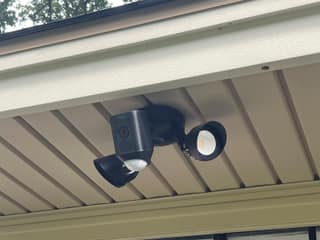
This was the most involved installation of any Ring product I own. My alarm took less than 30 minutes and required no tools. The floodlight took closer to an hour because I had to switch off the circuit, work from a ladder, and connect three wires.
If an exterior junction box is already in place and you're comfortable replacing a light fixture, the process is short:
- Kill the power at the breaker (do not skip this step)
- Pull down the old fixture and disconnect the wires
- Mount the Ring bracket to the junction box
- Connect the three wires (hot, neutral, ground) with the included nuts
- Attach the unit, restore power, and pair it in the app
The app guided me through pairing, and live video was working within a couple of minutes after I restored power.
Without an existing junction box, you'll need an electrician to run power, which adds to the cost. Position matters too. Ring supports the under-eave placement I used, but I spent several days nudging the camera and lights before the frame centered on my driveway instead of the street.
The Floodlights
The camera gets most of the attention, but my family notices the lights more often. They're brighter than the halogen fixture they replaced, and the motion trigger has been reliable. When I pull into the driveway after dark, the LEDs come on before I leave the car.
The app controls the lights separately from the camera. I can switch them on manually, set a schedule, and adjust motion sensitivity. During the holidays, I schedule them to stay on until midnight. For the rest of the year, motion handles them.
Default motion settings caused the lights to react to every passing car. I spent about ten minutes drawing zones over the driveway on a snapshot in the app. False triggers then dropped to almost none. The local raccoons still get through.
Video Quality
The 1080p camera gives me enough detail for its job. In daylight, I can read the logo on a delivery driver's shirt from 25 feet. Color looks accurate, the wide lens covers the approach to the garage, and Live View opens in a few seconds on my connection.
The floodlights make a bigger difference after dark. Motion turns them on before the camera records the scene, so I get full-color footage instead of only grainy infrared video. Faces, clothes, and vehicles are easier to inspect when the driveway is properly lit.
Two-way talk is clear enough to tell delivery drivers where to leave packages, though its roughly half-second delay can make conversation awkward. I've deliberately set off the siren twice. It's loud enough for my neighbors to hear.
The Night It Earned Its Keep
Around 2 a.m. on a summer night, a motion alert showed someone walking up my driveway and checking car door handles. The floodlights came on, making him stop and look toward the camera. I triggered the siren in the app, and he ran off the property.
A basic floodlight might have made him leave, and a camera would have saved a recording. With the lights, camera, and siren together, I could see what was happening and respond from bed. That night showed me what I was paying extra for.
The Ring Ecosystem
The Floodlight Cam shares an app with my Ring Alarm, video doorbell, and indoor cameras. During the storm described in my Ring Security review, an alarm sensor tripped and the nearby camera feeds were one tap away. I could quickly confirm that the wind had opened the door.
Floodlight motion events appear in the same timeline as the rest of the system. Linked-device settings can make an indoor Chime sound or tell other cameras to record when the floodlight sees movement. I use those connections with my other Ring equipment, but the camera also does its job on its own.
A Subscription Is Needed for Recordings
Without a Ring Protect plan, the camera still has Live View, motion alerts, and two-way talk, but it doesn't save video. I often check events after the alert has passed, so I count the subscription as part of the cost.
Basic costs $4.99 per month for one camera. Plus costs $10 per month and covers every Ring device at one address. My full alarm setup already puts me on the Pro plan, so this camera adds no separate fee. The Ring Security review has a detailed plan comparison. With more than one Ring camera, Plus makes more sense than separate Basic plans.
The Downsides
After two years, four things still bother me:
- Hardwiring limits placement. Without an existing fixture and junction box, installation becomes an electrician's job.
- Recorded video costs extra. A Protect plan adds a recurring charge to a camera that already costs around $200.
- Motion zones need attention. My default settings sent too many alerts until I adjusted them.
- Wi-Fi support is limited to 2.4GHz. My garage is close to the router, so the connection has been stable. A distant installation may need a mesh node or extender.
My Verdict After Two Years
I'd recommend the Ring Floodlight Cam first to a new homeowner whose garage already has a wired floodlight. It improves the lighting, watches a busy part of the property, and never needs a battery change. Mine hasn't needed maintenance in two years.
If you already own Ring gear, you also get one timeline and linked-device controls. If you don't, factor in the subscription and electrical work before buying. For me, the clear night footage and the siren I used during the car-prowler incident justified paying more than I would for an ordinary floodlight.
Where to Buy
I bought mine on Amazon and have seen it discounted below list price several times. If you can wait, a sale can lower the roughly $200 upfront cost. Check the return policy before installing it, since mounting and wiring a fixture is more involved than trying a camera on a shelf.


