


The verdict · Ring Video Doorbell Pro
I haven't had to charge or maintain the Ring Video Doorbell Pro in two years. Its narrow body fits my tight door trim, and custom zones keep passing cars from flooding my phone with alerts. It does need doorbell wiring, recordings cost extra, and my recessed entry needed the included wedge.
What works
- I haven't had to charge it once in two years
- The slim faceplate fits trim too narrow for a battery model
- The included wedge gave my recessed entry a useful viewing angle
- Custom motion zones stopped almost all alerts from passing cars
- Notifications arrive quickly, and two-way talk is clear enough for deliveries
What doesn't
- Recorded video requires Ring Protect, starting at $4.99 per month
- Installation requires doorbell wiring or a plug-in adapter
- Video and phone alerts stop when the Wi-Fi connection goes down
Ring Video Doorbell Pro — key specs
| Power | Hardwired to existing doorbell wiring; no battery |
|---|---|
| Video | 1080p HD with night vision and Live View |
| Motion detection | Fully customizable motion zones (draw your own) |
| Two-way talk | Yes, with noise cancellation |
| In the box | Flat mount, approximately 15° wedge mount, tools, wire extensions |
| Install time | About 20 minutes with existing wiring |
| Subscription | Ring Protect from $4.99/month for recorded video |
On this page
The Ring Video Doorbell Pro was my first Ring purchase. Two years later, it's still the device in the lineup I'd buy first.


I installed it before the full Ring Security system, floodlights, or indoor cameras. I wanted to see who was at the front door without walking over to it, especially when I was away from home. Since then, it has recorded packages, solicitors, one persistent raccoon, and a storm that pushed the rest of my setup into action.
I haven't had to maintain the hardware. My biggest problem came from mounting it flat in an entry that needed an angled wedge.
Two Years at My Front Door
I bought the Video Doorbell Pro and installed it on my front door more than two years ago. Since then, I've answered visitors while two states away, adjusted the motion zones to exclude passing cars, and fixed the poor angle from my first installation.
It now runs alongside my Ring alarm, Chimes, and Floodlight Cam, though I also used the doorbell on its own before building out the rest of the system.
A Slim Body for Narrow Trim
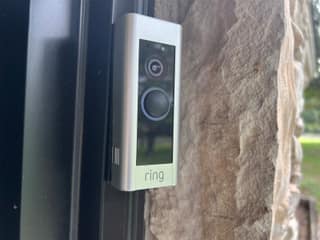
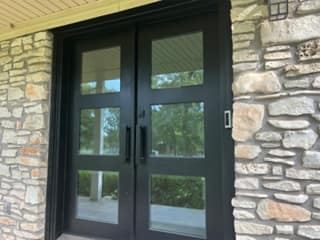
The hardwired Pro is slimmer than Ring's battery doorbells, and that mattered at my house. My black metal door frame meets a stone wall, leaving about two and a half inches of flat trim. A bulky battery model wouldn't fit there. The Pro's narrow faceplate leaves a little room on either side and looks right beside the door.
The satin metal faceplate surrounds a matte camera section, with the lens above the illuminated button. Mine has spent two years in Texas summer heat and storms that drive rain sideways into the entry. The faceplate has kept its finish, and the lens hasn't fogged.
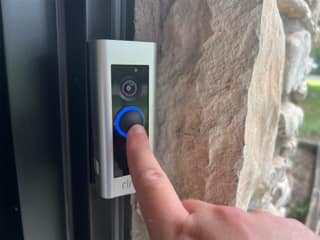
When someone presses the button, its blue light spins to confirm the ring. Visitors usually press it once instead of wondering if the bell worked and trying several more times.
Installation and My Mounting Mistake
The Pro connects to two low-voltage doorbell wires at the back of the unit. Because my house already had a standard doorbell, the physical installation took about 20 minutes: switch off the breaker, remove the old button, connect the wires, secure the mounting plate, and attach the Pro. The app handles setup after power returns. Since then, I haven't had to remove or charge anything.
The wiring was straightforward. Choosing the mount was not.
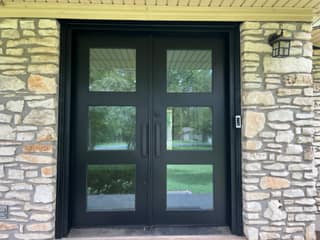
My double doors sit between two stone columns, with the doorbell on side trim that runs perpendicular to the walkway. Mounted flat, the camera looked across the doorway toward the opposite column. Visitors didn't enter the frame until they were close to the door, so alerts could arrive after a package was already on the mat.
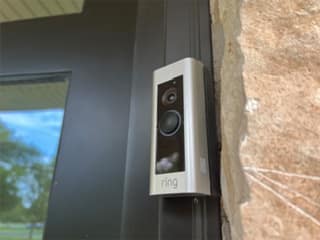
Ring includes an angled wedge that turns the camera roughly 15 degrees. That small change moved most of the opposite wall out of frame and brought the walkway and part of the yard into view. Alerts then arrived while a visitor was still about ten feet from the porch rather than inches from the door.
Installation lesson: Before drilling, hold the doorbell in position and check Live View on your phone. A recessed door between columns, inside an alcove, or behind a storm-door frame may need the wedge. I learned that after leaving a second set of screw holes in my trim.
Video and Motion Detection
The 1080p video is sharp enough for me to read a delivery label and wide enough to cover the porch. With a solid Wi-Fi connection, Live View opens in a couple of seconds. Two-way audio is clear enough for me to direct delivery drivers to a safer spot for a package while I'm across town.
Night vision covers my unlit porch well enough to identify the raccoon that keeps visiting.
Custom motion zones let me be more precise than a simple detection radius. I drew mine around the walkway and porch but left out the street. Passing cars stopped triggering constant alerts, while a person turning onto the path still sets it off. It took about ten minutes and saved me from the flood of false alarms that makes camera notifications easy to mute.
App and Notifications
Motion notifications usually reach my phone within a couple of seconds, both at home and when I'm out of state. A snapshot in the alert often tells me it's the mail carrier without making me open Live View.
The doorbell shares an app with my alarm and floodlights. My Ring Chimes also work as indoor doorbell speakers, carrying the ring to rooms where I can't hear the outdoor unit. When a storm blew my front door open, I used the doorbell footage from my bedroom to confirm that the wind, rather than a person, had tripped the contact sensor. The full account is in my Ring Security system review.
Recorded Video Costs $4.99 per Month
Without a Ring Protect plan, the doorbell still rings, sends alerts, opens Live View, and supports two-way talk. It doesn't save recordings. Reviewing an event after it ends requires at least the Basic plan, which costs $4.99 per month for one camera.
Basic is enough for one doorbell. I pay $20 per month for Pro because my account also includes an alarm and several cameras, but you don't need that tier for the doorbell alone. My security system review compares all three plans.
Some competing cameras can save footage locally without a monthly payment. Ring's fee hasn't made me stop using the Pro, but I count it as part of the price rather than an optional extra.
Drawbacks
Beyond the subscription, check the power and Wi-Fi situation at your door before buying.
The Pro requires existing doorbell wiring, or a plug-in adapter with a route for its cable. A battery model is easier at a door with no wiring, though its wider housing may not fit narrow trim like mine.
Video depends on Wi-Fi and Ring's servers. During an afternoon internet outage, my Chime still rang when someone pressed the button, but the doorbell sent no video or phone alerts. Other cloud cameras have the same weakness, and the Pro has no local recording to fall back on.
My Verdict After Two Years
After two years, the Video Doorbell Pro feels more like a fixture than a gadget. It records a useful view of the porch, delivers quick alerts, and lets me answer the door when I'm away. Hardwired power has spared me a recurring charging chore.
This is the first Ring device I'd buy for a home with existing doorbell wires, especially if an alarm or more cameras may follow. The $4.99 monthly recording fee is still the drawback that bothers me most. Before mounting it, check the angle in Live View; the included wedge fixed a problem I should have caught on day one.
Where to Buy
I bought mine on Amazon with the rest of my Ring equipment. I've seen it drop below list price during Prime Day and Black Friday, so I'd wait for one of those sales if you can. Check the dimensions against your trim before ordering, even if the retailer offers easy returns.


